Friday, October 5, 2018

Linux Operating System, Operating System Basic Question


Operating System 


Linux Operating System, Operating System Basic Question. A Linux operating system is a system software that acts as an intermediary between the user and the computer hardware. The purpose of a Linux operating system is to provide an environment so that a user can execute the program in a convenient way and efficiently.


Linux Operating System, Operating System Basic Question-Tec RV
Operating System


The computer has no existence of itself. This is just a group of hardware such as a keyboard, monitor, CPU etc. The operating system establishes a connection between all the hardware. Due to the operating system, the user does not need to keep the information on different parts of the computer, as well as the user can do all his work without stress.

What year was the Internet Invented

The operating system records the status of each resource of the computer system and also decides when and for how long the computer resources will be controlled. The Operating system is the first program that is loaded into the computer's memory after the computer is switched on.

1- Features Of Operating System:-


(A)- Multi-Tasking:-


Interactive control in more than one process kept in memory is known as multi-tasking. Before deleting the control from a program, its former condition is secured, when control comes on this program, the program stays in its former state. In multitasking, the user feels like all the work is going on simultaneously.

(B)- Multi-Processing:-


For more than one work execution at one time, more than one CPU is present on the system. This technique is called multi-processing. Multi-processing system has been built keeping in mind the multi-processor system. Therefore, due to the availability of more than one processor, the input-output and processing are coordinated between the three functions. The system using more than one CPU of the same type is known as the symmetric multi-processor system.

(C)- Memory Management:-


Programs and statistics have to be stored in memory before executing. Most operating systems provide more than one program to stay in memory at one time. The operating system determines that the memory being used does not overwrite the memory used when the program is exhausted.

(D)- Multi-Programming:-


Multi-programming is the process of operating more than two processes at one time. Based on special techniques, CPU It is decided by which of these programs to run the program. At the same time, the CPU When a program runs, the output division receives the result of the completed program from CPU, and the input division uses any other program as. Enters CPU In this process, all the components of the CPU are fully engaged.

(E)- Distributed:-


Distributed working framework deals with a gathering of particular Computers and influences them to have all the earmarks of being a solitary Computer. The advancement of organized Computers that could be connected and speak with each other offered to ascend to appropriated figuring. Circulated calculations square measure done on in way over one machine. At the point when Computers in a gathering work in participation, they frame a conveyed framework.

(F)- Real-Time:-


The process of the real-time operating system is very fast, the real-time operating system is used when the computer is being controlled by a certain work. The result of this type of experiment is immediately received. And this result is immediately used in its calculations. The process to be controlled when needed can be changed. Through this technique, the work of the computer is consistently taking data, calculating them, arranging them in memory, and giving directions based on the results of the calculation.

(G)- Security Management:-


The operating system installs data security and integrity. That is, the operating system keeps different programs and data in such a way that they can not interfere with each other. Apart from this, The Operating system prevents data from being deleted by the wrong user.


2- Basics of Popular Operating Systems:-


  • (Windows, Linux, Mac OS)


(A)- Windows:-


Windows is a working operating system planned by Microsoft. The working operating system is the thing that enables you to utilize a Computer. Windows comes preloaded on most new computers which makes it the most prevalent working operating system in the world. Windows makes it conceivable to finish a wide range of regular errands on your Computer. For instance, you can utilize Windows to peruse the Internet, browse your website, tune in to songs, play favorite games, alter advanced photographs thus substantially more. Windows is likewise utilized as a part of numerous workplaces since it gives you access to profitability devices, for example, timetables, word processors, and excel.

(B)- Linux:-


Linux is a multiuser multitasking operating system. The Linux operating system was created by Linus Benedict Torvalds in 1991. He posted data about his task on a newsgroup for Computer understudies and software engineers and got support and help from volunteers who prevailing with regards to making a total and practical portion. Linux is Unix-like, however, was produced with no Unix code, dissimilar to BSD and its variations., Linux is an open source operating system that can allow Linux to access without any permissions. Despite the fact that assessments propose that Linux is utilized on just 4.72% of all "work area" (PC) Computers, it has been generally embraced for use in servers and implanted frameworks, for example, PDAs. Linux has superseded Unix on numerous stages and is utilized on most supercomputers including the main 385. Huge numbers of similar Computers are likewise on Green500 (yet in the diverse request), and Linux keeps running on the best 10. Linux is additionally usually utilized on other little vitality effective Computers, for example, cell phones and smartwatches. The Linux part is utilized as a part of some prevalent circulations, Debian, for example, Red Hat, Linux Mint, Ubuntu, and Google's Android, Chrome operating system, and Chromium operating system.

(C)- Mac OS:-


Mac OS is the working system software(OS) that powers each Macbook. Mac OS, the working operating system created by the American computer organization Apple Inc. The OS was acquainted in 1984 with run the organization's Macintosh line of computers.

It gives you a chance to do things you basically can't with other computers That is on the grounds that it's outlined particularly for the equipment it keeps running on and the other way around. macintosh OS accompanies a whole suite of flawlessly designed apps. It works as an inseparable unit with iCloud to keep photographs, archives, and another stuff breakthrough on devices. It influences your Mac to work like enchantment with your iPhone. Furthermore, it's been developed starting from the earliest stage protection and security in mind.


Wednesday, October 3, 2018

Types of Computer Output Devices | The Different output devices of a computer


Output Devices


Types of Computer Output Devices The Different output devices of a computer. When a device sends out the signal from the computer, then that device is called the output device, there are many such devices like the speaker is used to send this sound signal out of the computer so it is a computer's output device Similarly, when we want to print any document or photo we need to send the signal to the printer from the computer and Then we get a printout printer is an output device.
Output devices are those devices that provide information or results from computer systems as hard copies (From the printer) or as softcopy (From the Monitor). Some output devices that are commonly used, are as follows.


1- Monitor:-


The monitor is an output device. This is also called a visual display unit. This is like watching TV. The monitor is one of the most important output devices. Without it the computer is incomplete. It displays the output as a soft copy on its screen. 


Types of Computer Output Devices | The Different output devices of a computer- Tec RV

Monitor


These are of three types of monitor.


  • (A) CRT (Cathode Ray Tube) Monitor 

  • (B) LCD (Liquid Crystal Display) Monitor 

  • (C) LED (Light Emitting Diodes) Monitor


2-Printer:-


Types of Computer Output Devices | The Different output devices of a computer- Tec RV

The printer is an output device, it is used to make the hard copy of computer data. After keyboard, the printer is the only device that is used most often. Printers are used to print office documents in offices, homes and business establishments. Generally, the printer is connected to a computer with a wire, and it gives you a print when you have the Ctrl + P command from any application. But new technologies are used with the latest printers. Wireless printing is the main. In this, the printer is connected to Wi-Fi and the cloud. By sitting away you can command the printer. With Cloud technology, you can also command the printer and print the from mobile.


The printer is classified as follows.

  • (A) Impact Printers 

  • (B) Non-Impact Printers


3- Plotter:-


Types of Computer Output Devices | The Different output devices of a computer- Tec RV

The plotter is a type of printer that is used to print vector graphics. A plotter is an output device that works to print graphs and designs. It is normally used to create large size graphs and maps such as engineering design, painting, and large size posters. Digital-run Plotters use XY Writer as the output tool so that they can take their measurements intently. In earlier times, Plotter used to work on computer software programs such as Computer Aided Design (CAD) though it has been removed by a new Conventional Printer. This works to give the printing of plotter output. It creates pictures on pages with the help of a pen. Plotter works for the design of the ship, machine, and building.
Based on the method of plotters working, they are divided into 2 parts.


  • (A) Drum plotters 

  • (B) Flatbed Plotter


4- Projector:-


The projector is the device of


Types of Computer Output Devices | The Different output devices of a computer- Tec RV


computer hardware output, which shows the information given by the computer by projecting it on a white screen or on a wall. These lights work on the basis of projection. In which it lights the lights on a wall. They were made to appear in the film. They are used in the classroom and auditorium to give a presentation. Lenses have also been used to enhance the quality of their image, so that small images are also successful in appearing in large numbers. Because the image is made of light, this image is transparent.


5- Headphone:-


Types of Computer Output Devices | The Different output devices of a computer- Tec RV

The headphone is a hardware device that can be plugged in to listen to audio without disturbing privately in surrounding areas in a computer, laptop, smartphone, MP3 player or other devices. They are plug-and-play devices and do not require any installation before use. The headphone is also known as earphone or style, also known on the basis of the earbud.


6- Speaker:-


Types of Computer Output Devices | The Different output devices of a computer- Tec RV

Speaker is one of the external hardware of computer hardware. The purpose of connecting them with the computer is that you can listen to the computer's audio sound. It takes an electronic signal from the computer connected to the CD, DVD etc. from the save audio (eg songs and videos) and converts it to audio. While multimedia and games are becoming very prominent, the speaker has a big contribution to their use. The computer sound card is not so powerful enough that it can run a speaker, so the speaker is required to work separately to work. Today we get speakers and speakers working on different sizes and frequency.


Tuesday, October 2, 2018

Types of Motherboard | Motherboard Components & their Functions


Motherboard


Types of Motherboard, Motherboard Components and their Functions. Hello friends, if you have a desktop computer, you must have opened it sometime and you must have seen the components inside of which there are either a Types of a Motherboard or if you have not even opened it, then you have about the motherboard. If you have not heard anything said earlier, it is a very important thing on the computer. About that, all of us should have basic information. In today's post we will talk about this Motherboard and know Area is what causes it and what works and we also know how it works .. then let time without a whole repertoire further grow.


Types of Motherboard | Motherboard Components and their Functions
Motherboard


1- What is the Motherboard:-


Friends, a computer is a part of the computer or hardware that connects the rest of the other parts like the processor, RAM, hard disk etc? The motherboard is actually a printed circuit board i.e. PCB. If you have seen it quite a lot then you may have noticed that inside it looks a lot of small and very thin wires which are inside the board. All these wires are all things Work to connect in the ups and downs. And due to the same wires, all the components of our computer are able to communicate among themselves or there is an address to send data between us.

Motherboards have different slots to connect to different devices like hard disk, RAM, CD DVD Writer, CPU, Graphics card etc. Through which all these things are connected to it. The motherboard is also connected to our computer's SMPS i.e. power supply and also sends power to other devices as well as it also decides how much power the device should give. 


2- History of Motherboard:-


Talks about the history of the Motherboard, the first company to name the motherboard is IBM, which was launched in 1981. It was a very basic board, but after almost 3 years of this, in about 1984 we found an improved version of this which was based on a popular technology called AT Advanced Technology, and it was said to be the motherboard type besides technology. can go.

Although initial motherboards launched by IBM came with their PC. After that many companies in the market started their motherboard like Apple, Intel etc and many new and big changes were seen in time with this, and due to this, the motherboard we see nowadays is very advanced.


3- Types of Motherboards:-


There are many types of such motherboards and it also follows the needs of the user, so that we will only know about the types of which we need to know about.


(A)- AT or Advanced Technology:-


This is the oldest type of motherboard. But if you are thinking that if this is the oldest type then why is its name AT? For this reason, when it was launched, it was a kind of Advance technology, AT motherboard was made for the 286/386 and 486 processors, it used to be two power connectors of 6-6 pins. It used to be used in the 80s


(B)- ATX or Advanced Technology Extended:-


ATX i.e. Advance Technology Extended This type of motherboard was brought in the 90s and is still using the same in your computer. These motherboards have been made to run nowadays processors and they are also being updated day by day.

(C)- LPX or Low Profile Advanced Motherboard:-


LPX technology was first developed by WD i.e. western digital. This type of motherboard is very small and low power consuming. They are also being used in many places nowadays like using a processor and RAM type graphic card using this type of motherboard. It is applied only.

Who Invented Mouse? 

Apart from these, there are several types of computer motherboards. Such as BTX, EATX, Pisco BTX etc., which are not used so much.


4- Motherboard's form-factor (texture):-


(A)- CPU Socket:-


The CPU socket or central processing unit is the part of the socket motherboard where the CPU or processor is installed, it is the largest part of the motherboard, as there is space for putting the CPU in addition to putting the heat sink and CPU cooler. There are many small sockets or pins inside the CPU socket, through which the CPU is connected to the rest of the system. It is very small and very fragile.

(B)- Controller and Integrated Peripherals:-


There are several small controllers or integrated circuits in the motherboard, because of which we can connect different things in it. All of these ICs are similar to small chips. On this motherboard, you will find lots of views. like

(C)- Disk Controller:-


It works to control all the disks such as hard disk or floppy disks.

(D)- Integrated Graphics controller:-


These are used to control and order the graphics processor or GPU of our computer.

(E)- Integrated Sound Card:-


In today's motherboards, you do not have to install the sound card separately as they get an inbuilt sound card. 


(F)- Ethernet controller:-


It is designed to control the Ethernet or Wired Internet.

(G)- USB or Universal Serial Bus Controller:-


it controls and manages all the devices connected through USB.

(H)- Card and other slots:-


These are different in different type motherboards, through these slots, we find some extra cards like USB card sound card graphics cards etc. on our computer. It nowadays is of two types PCI-E 16x or PCI-E 4x, we use it mostly for installing Graphics Card in our computer.


5- What is the work of the Motherboard?


(A)- Connecting Components to Each Other:-


The first and most important thing on the motherboard is that it connects all the components of the computer to each other or the entire computer is connected to the motherboard. That is why it is also called a component hub of the computer.

(B)- Power up to the components:-


After this, the second biggest job of Motherboard, which is Bo, is to power up to other components, because without any power none of our computers are working and the power supply of our computer is also connected to the motherboard.

(C)- Access data to components:-


Whatever the flow of data between the components is handled by the motherboard as all the components are connected to it and the data has to go through this to move the data from one component to another.

(D)- Taking inputs and outputs:-


As we have already known, all the components are connected to the motherboard i.e. the keyboard mouse and other input devices by which the input and output data also pass through the motherboard.


6- What is chipset?


Chipset calls for some small chips or groups of microchips. Through this, the data flow between the device from one device to another is possible on the computer. There are many examples of chipsets in the computer such as the Northbridge chips that maintain the flow of data between the processor and the RAM and the second Southbridge chips, which maintains the flow of data between another medium such as sound card USB etc.


7- What is a Bus?


There is a means of flipping data inside the computer. It is the smallest small wires that are visible in the motherboard, through which data can be sent from one device to the other device. Bus in the computer works on a single speed, this speed is measured in MegaHertz.


Monday, October 1, 2018

What is Input Devices | Classification and Definition


What is Input Devices?


What is Input Devices Classification and Definition? The input devices of the computer are electromagnetic devices that receive the data and accept the set of from outside data or reference and translate this data into the machine's meaningful and readable form. Computer input devices operate in the form of communication and correspondence between the computer and the outside world. With these tools, the user can enter the data and later the data can be stored in computer memory for additional resources and preparation. After processing and handling, the desired and converted result can be obtained with the help of the computer's output device. Common examples of the input device of the keyboard and mouse computer system are the many tools used for input with the use of these devices, which are capable of entering text, pictures, audio etc.


What is Input Devices | Classification and Definition - Tec RV
Input Devices


  • Following Are The input device:-


1- Keyboard:-


Computer keyboard resembles the old typewriter, but different buttons are given to perform various functions, such as numeric buttons to enter numerical values, alphabetical buttons to enter characters, specials like #, $, @ etc. Special buttons for entering symbols Multimedia buttons for audio and video users have 101 buttons on the normal keyboard, but as for computer technology Ikas continues, we can buy 102-124 button keyboard for special operations. Keyboards are also available in a language other than English.


2- Mouse:-


The mouse is an input device, whose real name is Pointer Device. Use of the mouse is mainly used to select items on their computer screen, go to them and open them. The user gives instructions to the computer using the mouse. By this, a user can access anywhere on the computer screen. The ordinary mouse usually looks like a real mouse. It is small and rectangular, which is connected to the computer through a cable.
Mouse are three types of.


  • Mechanical Mouse 

  • Optical Mouse 

  • Infrared (IR) or radio frequency cordless mouse 


3- Microphone:-


A microphone is a Input device that turns your voice into digital data. This is also called a mic. It is used on the computer as an input device. With this help you can put audio data in your computer, as well as you can type it in your computer because it contains a machine that recognizes your voice and typed it on the basis of that. For this, just have to connect your microphone to your computer and then the one you want to type in the mic has to speak. Typing in this way saves you time. To connect the microphone to the computer, you have a port in your computer, and it is also very important to have the sound card installed on your computer in order to use it in your computer.


4- Computer Pen Input:-


Computer Pen input device is the input device of computer hardware that is used to insert information into the computer. These are used in place of the keyboard or the mouse. To use them, your computer must have a special operating system that understands handwriting. Only when you have this software, you can write something instead of typing on your computer or tablet. These are the instruments used by holding in hand.
These are of 3 types.

  • Light Pen 

  • Digitizer 

  • Stylus and Cursor


5- Scanner:-


A scanner is a device that takes an image from computer print, photographic print, poster, magazine, and page etc. for computer editing. The scanner allows your computer to take a printed image document and convert it into a digital file. You can add a scanner to a computer via USB, Firewire, Parallel, and SCSI. There are many types of scanners available and they are used to scan black and white or colorful data. Scanners mostly come with software such as Adobe's Photoshop product. With this software help, you make some changes in the scanned image. The scanner is connected to your computer, the SCSI (Small Computer System Interface) needs to be used to connect the scanner to the computer. It has an application such as a photoshop which is used to read the image.
These are of 3 types.


  • Sheet-fed Scanner 

  • Handheld 

  • Drum


6- Webcam:-


The webcam is a hardware input device that makes a video of any person or image coming in front of it. Most laptops come with a webcam or you can connect it to a computer's USB port with a cable. It is also called a small digital camera of a kind. Webcams allow you to connect to a person's picture or video through the Internet. It is used mostly for talking on video with the help of internet. Which is also called video chatting. The first webcam was created in 1991. 


7- Digital Camera:-


A Digital camera or Digicam is the Camera, which can be stored on Digital Pictures and Video. Nowadays, most digital cameras are being sold in cameras. Nowadays digital camera has been included in vehicles such as mobile phone (smartphone) devices. The digital camera has been made part of the movie. In an optical system of a digital camera, a lens is used to concentrate the light. More photos and videos can be stored in a digital camera than a traditional camera. And they can use a variety of memory cards to store them. A digital camera can be connected to the computer by USB cable.


8- fingerprint Scanner:-


It is common for any android mobile to come in today with a fingerprint scanner or sensor. Friends, today we will know about this fingerprint scanner how it works. Because of this, the security of our mobile is greatly increased. If we have a fingerprint scanner in our mobile, then with the help of it, if we lock the phone, then no one else will be able to open it. Because it will not match the fingerprint of that person. That's why mobile security with fingerprint scanner hone increases significantly.


9- MICR(Magnetic Ink Character Recognition ):-


You have been using the bank checking with MICR technology for a long time but do you know that a special technique on bank check is used MICR if you do not know what happens MICR If you have not noticed yet, then now look at your bank check on where the check number and some information is written. There is a special factor in the information that MICR detects is the full form of MICR Magnetic Ink Character Recognition (Magnetic Ink Character Recognition) The characters that are written are written with Magnetic Ink which MICR detects the reader MICR one A character based on Character recognition technology is a process to process a checker, which has a scanner that reads the printed magnetic ink character code on the check. MICR encoding is also called the MICR line, it is called the lower part of the check.


10- Barcode Reader:-


The Barcode Reader is a computer hardware input device that is used to read the information that is given in the bar code. They are also called price scanners and POS (Point of Scale). Once inside the Barcode reader, a scanner (for scanning the barcode), a decoder (for decoding the barcode) and a cable that helps it connect to the computer. The barcode does not make any language of any information, but it decodes all the information and sends it back to the computer software, in which the software that the software has been engaged, understands the language of the bar code. The barcode is very easy to use, after adding it to the computer, you can easily use it by holding it in your hand or by putting it in a stand.


11- OCR(Optical Character Recognition):-


OCR or Optical Character Recognition is a technology that enables you to convert different types of documents. Images taken from scanned paper documents, PDF files or a digital camera from this technology can be converted into edit and searchable data. Technically, OCR, handwriting, printed or typed text that converts the electronic or mechanical version of the images into machine-encoded text.


Sunday, September 30, 2018

What is Characteristics of Computer- Speed-Accuracy and AI


Characteristics of Computer


What is Characteristics of Computer- Speed, Accuracy, and AI? A Computer is an electronic gadget which is utilized to store the information, according to given guidelines it gives results about rapidly and precisely. Computer turned out to be exceptionally well known and more imperative part, the unavoidable gadget of the present world on account of its characters like right and reliable output, rapid, precision and so speed. Nowadays, computers are seen in all departments. Whether it is a power division or a hospital or a police station, it will be meet to see a computer. 


What is Characteristics of Computer- Speed Accuracy and AI - Tec RV
Characteristics of Computer


  • Following are the Characteristics of Computer


1- Accuracy:-


The exactness of a Computer is high. It can error out the computations with zero blunder rate. A few mistakes may happen in the computer fault. they are for the most part because of the human blame.

Who invented Television First Time?


Notwithstanding being quick, Computers are additionally precise. the mistake that may happen can quite often be ascribed to human mistake (incorrect information, ineffectively outlined Computer System or defective guidelines/programs composed by the developer). Computer depends on the rule of input and output. In the event that wrong information is given as information then it will create wrong information as yield.


2- Speed:-


The computer is a very fast electronic device. A powerful computer is capable of performing almost 3-4 million simple instructions per second. The computer has units of speed in a microsecond, nanosecond and even in the picosecond.

Computer gadgets, these days, works at a stunning pace that we can't envision. It works so quick as it works utilizing electric signs which run like light-speed. In the event that the littlest unit of time for people is a second, Computers work by the following.


3- Storeroom:-


The Computer accompanies the high storeroom to capacity to store any measure of information in it. A snippet of data once recorded (or stored) in the Computer, can never be overlooked and can be recovered quickly.

Not just that, the most Computer accompanies expandable storeroom alongside outer capacity. The Computer is fast to the point that it additionally requires unnoticeable investment to discover the information client require from this tremendous stockpiling


4- Diligence:-


A Computer is a machine, not a living being, it never can be tired. Not at all like person, Computers are exceptionally reliable. Just, it can likewise continue rehashing an indistinguishable undertaking from ordinarily as it is asked as well. Computers, along these lines, are superior to individuals in performing voluminous repetitive employment.


5- Capacity:-


The capacity of the Computer is high. For a person, it is extremely hard to work persistently for a considerable length of time without losing stability, yet Computers don't lose focus and can work for a considerable length of time without making any mistakes.


6- Reliability:-


The Computer is a Electric running equipment multipurpose and multiprocessing machine. It gives data with high accuracy without any mistakes.
Despite the fact that Computers work this quick, they still provide reliable outputs. Notwithstanding, to get right yield, the input must be right as well. an output from a Computer is reliable to the point that if the output is unforeseen then it is called, "Garbage in, Garbage out".


7- Memory:-


While Computer has the capacity to store client's information (generally), it likewise accompanies memory which is utilized by the Computer itself to work quick. Memory gadgets are costly than capacity, along these lines however a Computer, nowadays, can work with almost 256 GB of recollections, most PCs accompany 8 GB to 16 GB of RAM (volatile memory) or Primary Memory. Computer likewise incorporates ROM (non-volatile), and Cache recollections of various levels and enroll recollections. Among these, for the most part, the RAM is expandable.


8- Automation:-


Once the computer is given work, then it completes that work without interrupting the work. Just like when an engine is turned on once, it keeps running until it not be stopped. In the same way, a computer also runs. Unless the computer is not stopped by the person or the power is not cut.


9- Versatility:-


The Computer isn't just being used to ascertain numeric qualities. it has a limit with respect to multitasking. You can appreciate sight and sound, word handling, printing, and conveying occupations from one stage without shutting other. The Computer is being used in medicinal, logical tests, mixed media works and so on. Computers cover for the most part every region we can consider, nowadays. This type of works has made it adaptable and prevalent.


10- Artificial Intelligence (AI): -


The fifth generation Computer which perceives voice depends on man-made brainpower. The AI is connected in gaming programming, and mechanical technology for a long time, however, the working framework in light of AI is likewise in a procedure which can perceive a voice as well as read the state of mind of clients too. It gives suggestion and choice on complex issues.


Friday, September 28, 2018

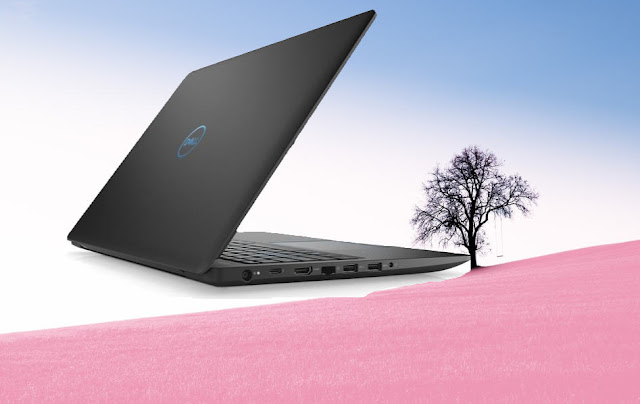
Dell G3 15 Gaming Laptop Review Performance - Tec RV


Dell G3 15 Gaming Laptop


Dell G3 15 Gaming Laptop Review Performance. We have had this impression for an extended time that Dell G3 15 is one in every one of those corporations that produce reasonable laptops that associate with spectacular specs. And this name has positively served the corporate well within the past. And after I 1st found the Dell G3 15 diversion laptop computer, this thought popped into my head instantly. This modest laptop computer comes with spectacular specs despite having a beginning worth purpose of Rs sixty-nine,090 and puts out a tricky challenge for its competitors.


Dell G3 15 Gaming Laptop Review Performance - Tec RV
Dell G3 15 Gaming Laptop


1- Design of Dell G3 15 Gaming Laptop:-


The body of the laptop computer is formed from a gray-blue plastic and features a matte end, with the Dell emblem inscribed in chrome blue at the rear of the device. The keyboard of the Dell G3 15 features a back-light and uses equivalent chromatic highlights to print the letters thereon.

Who invented Electric Bulb?


On the opposite hand, the device itself isn't too thick the least bit and is just zero.89-inches at its thickest purpose. It will have some massive bezels on all the perimeters of the show that makes the device appear as if a 17-inch show laptop computer once closed, whereas really, it's simply a 15-inch show laptop computer. It’s a rather nettlesome style, however, once you're obtaining the good thing about in terms of worth.

The Dell G3 15 is a smaller amount concerning appearance and a lot of concerning practicality. however, this by no suggests that is a sign that this laptop computer feels too cheap; it's a solid build quality behind that plastic exterior. The laptop computer weighs in at around a pair of.53kg and in terms of ports and property, it's 3 USB ports, Associate in Nursing HDMI port, Associate in Nursing LAN jack, Associate in Nursing an SD-card slot.

so far on diversion laptops. however, that's of very little consequence since serious gamers tend to use a separate mouse once diversion. As for the show, it is a 15.6-inch Full-HD 1920 x 1080 resolution IPS Anti-Glare LED-backlit show that produces some crisp pictures. The glare on the screen isn’t tons despite the show is somewhat shiny. In daylight, it will appear to seem a touch light.


2- Performance of the Dell G3 15 Gaming Laptop:-


The one section wherever the Dell G3 15 goes to be winning the hearts of its consumers is that the performance of the laptop computer. For its worth purpose, Dell is providing the eighth Generation Intel Core i7-8750H Processor that is that the 6-Core, 9MB Cache, up to 4.1GHz w/ Turbo Boost variant, at the side of the NVIDIA GeForce GTX 1050 Ti with 4GB GDDR5 GPU on the top-end variant of the Dell G3 15 diversion laptop computer. In terms of storage, it uses a 128GB Solid State Drive that functions because of the Microsoft Windows Boot drive and for restricted use, at the side of a 1TB 5400RPM disk drive for the precise purpose of mass storage. These mixes to create the laptop computer a really compelling package for the worth.

I tested out the performance of the laptop computer with games like PlayerUnknown’s Battlegrounds, Fortnite, Monster Hunter World and Shadow of the place Raider. And it ran all the games virtually even on ‘Ultra’ settings. to provide Associate in Nursing example, it ran PUBG at a median of eighty Federal Protective Service, Fortnite on ninety Federal Protective Service, Monster Hunter World on seventy Federal Protective Service and Shadow of the place Raider on forty-five Federal Protective Service. These numbers have to be compelled to satisfy the general public UN agency area unit defrayal anyplace between Rs 70,000 to Rs 50,000 on the device.

But for those who believe benchmarking, the Dell G3 15 scored four,398 on computer Mark that is employed to establish however a tool would perform day-after-day tasks for Associate in Nursing workplace leaver. And this score indicates that it's terrible on the point of the performance of a median diversion computer and far higher than an everyday workplace computer. On 3DMark one0’s 
Time Spy 1.0 benchmark for games, it scored a pair of,377 that is best than most notebooks and shut to a diversion computer in terms of performance.


3- My Opinion:-


With the Dell G3 15 diversion laptop computer, Dell tries to stay its name as a budget diversion laptop computer maker intact. And it will manage to try to, therefore, with its basic appearance and power-packed insides. The Dell G3 15 may be a worthy investment for a gamer UN agency desires movableness on a budget, and also the sacrifices area unit mostly cosmetic.

This would possibly attractiveness to tons of individuals since the Dell G3 will attain performance with competence. it's going to not appear as if a spick-and-span laptop computer oozing RGB lights and different decorations, however, it'll game like one, therefore creating it ideal for performance on a not-so-high budget.


Wednesday, September 26, 2018

Redmi 6 Pro Design, Specification And Performance


Redmi 6 Pro


Redmi 6 Pro Design, Specification, And Performance. The company launched Redmi 6, Redmi 6A and Redmi 6 Pro smartphones this month. Redmi 6 Pro is the most expensive smartphone in all three and its price starts at Rs. 10,999. At the dispatch, the organization had informed that the Redmi 6 Pro was intended to be a power client. Talking about determinations, we didn't discover anything new in the gadget. We utilized this smartphone for some time and investigated it. Know what the phones are in the strengths and weaknesses.


Redmi 6 Pro Design, Specification And Performance - Tec RV
Redmi 6 Pro


1- Design:-


build quality, then Shami has always done better and there is something similar with the Redmi 6 Pro. The smartphone comes with a metal unibody design. The phone is a bit heavy and it looks like a little too chemo for the Xiaomi Redmi Note 5 Pro. Radmi 6 Pro is the dual rear camera and fingerprint sensor on the rear. The bells are thick in the phone. Xiaomi is not making many changes in the look of its smart-phones compared to other smartphone companies.

The handset, power button and volume rocker buttons are given on a right side. There is a SIM card plate on the left side. The good thing is that in Redmi 6 Pro, two SIMs and one MicroSD card slot have been given. IR Blaster and audio jacks 3.5mm are provided on the phone while the micro USB ports and speakers are under.


2- Display:-


Like other existing cell phones in the market, Shaomi Redmi 6 Pro additionally accompanies 18: 9 perspective proportions. This cell phone has a 5.8-inch IPS LCD Full HD show with a goal of 1080x2280 pixels. The showcase is very brilliant and there is no issue in utilizing the telephone even in daylight. 

Shaomi has chipped away at his new cell phone in his presentation and we saw it in Redmi 6 Pro. Shading proliferation is better on the telephone. In the event that you don't care for the thump, at that point, you have the alternative of concealing it. Like alternate cell phones in Xiaomi, the perusing mode has been given in it. 

Notwithstanding shading propagation, differentiate layers are additionally great in the handset. Clients can likewise change the white parity of the showcase. Survey edges are likewise fine and because of the bigger showcase, gaming encounters are additionally great.


3- Performance:-


Qualcomm Snapdragon 625 processor has been given in execution Xiaomi Redmi 6 Pro. With this processor, all the work on the telephone is legitimately done. In any case, on occasion playing overwhelming battling diversions, for example, Shadow Fight, we saw issues like hanging. So in the event that you are considering purchasing gaming cell phones, at that point, Redmi 6 Pro isn't for you. 

The cell phone has 4 GB RAM and 64 GB inbuilt capacity which can be extended through MicroSD card. The sound understanding from the telephone is fine. The sound originating from headphones is superior to amplifiers. There was no issue calling us. 

Discussing the product, Xiaomi  6 Pro Android 8.1 keeps running on the Oryo working framework, which has the organization's UIU 9 skin. At the dispatch, the organization had declared that the gadget will get the MIUI 10 refresh soon. Applications like Facebook, Amjon and the telephone are as of now introduced on the telephone. 

An awful thing is that the cell phone does not have the choice to erase an as of now introduced application. The MIUI is as clear and more steady as ever. There were no issues while running the application. The telephone never hangs while performing multiple tasks and the multi-window highlight likewise works, as per our expectations.


4- Camera:-


Xiaomi Redmi 6 Pro has a double camera setup with AI highlights which is furnished with 12 megapixels essential and 5-megapixel auxiliary camera. The telephone has just been set up with the Redmi Note 5 Pro in the telephone. The camera has the AI Portrait Mode. The gadget has a 5 megapixel AI self-camera. Despite the fact that the camera does not work exceptionally well. 

We think about the camera of  6 Pro with a similar value run from Honor 9n. We saw that the picture is a moderate procedure in 6 Pro and there is likewise a lack of sharpness in the photos. 

The camera application is the equivalent as the other Xioemi cell phones. The organization has given numerous modes, for example, squares, manuals, scenes. Photographs that are caught in the light of sunshine come sparkling and shading generation is additionally fine. Electrical picture adjustment is additionally a normal. Moderate picture preparing is the primary issue of the camera.


5- Battery:-


To give power to the battery Redmi 6 Pro, 4000 mAh battery is given. The Xiaomi claims the 6 pro will get talk time up to 2 Days on a single charge. Nonetheless, amid the audit, we found that once a phone was accused of charging and all standard labor for one day. 


6-My supposition:-


starts with Xiaomi Redmi 6 Pro worth Rs 10,999. The telephone offers every one of the highlights of a spending handset. In spite of the fact that this is anything but an impeccable bundle that can be encouraged to purchase. The cell phone's weight is additionally marginally higher and the camera is likewise normal. This implies you can consider alternate choices accessible in the market. Shaomi Redmi can consider purchasing Pro-9N rather than Pro 6, which accompanies a similar cost. The outline and execution of Honor 9N are greatly improved.